Transform Your Workspace with the Excel Shortcuts Mouse Pad: A Review
Our Product Insight
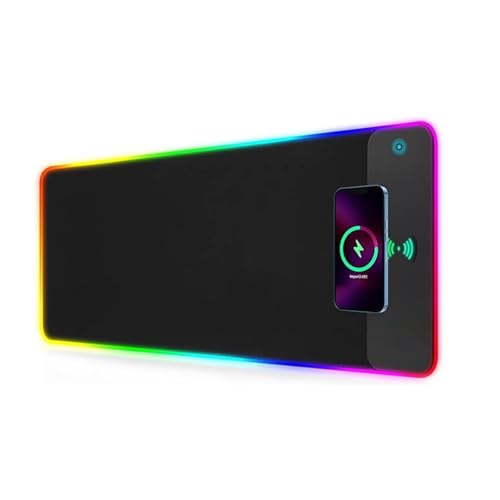
Are you looking to enhance your productivity while adding a splash of color to your workspace? The Excel Shortcuts Mouse Pad with Wireless Charging & RGB Lights is designed to do just that. This large, non-slip mouse mat not only provides a smooth surface for your mouse but also features handy Excel keyboard shortcuts right at your fingertips. With its built-in 15 W wireless charger and vibrant LED lighting, it’s a perfect blend of functionality and style.Key Features
Excel Keyboard Shortcuts
One of the standout features of this mouse pad is the printed Excel keyboard shortcuts. If you often find yourself navigating through spreadsheets, having these shortcuts visible can save you valuable time. You can quickly reference them without having to search online or flip through a manual. This feature is especially beneficial for students, professionals, and anyone who regularly uses Excel.Wireless Charging Capability
Gone are the days of tangled cords and searching for outlets. The 15 W wireless charging capability allows you to charge your compatible devices effortlessly. Just place your smartphone or wireless earbuds on the designated charging area, and you’re good to go. This feature not only keeps your desk tidy but also ensures that your devices are always charged and ready for use.
RGB Lighting
Let’s talk about aesthetics! The colorful LED lighting adds a modern touch to your workspace. You can customize the lighting effects to match your mood or the theme of your office. Whether you prefer a calm blue glow or a vibrant rainbow effect, the RGB lights can be adjusted to suit your preferences. This feature is not just about looks; it can also create a more inviting and enjoyable work environment.
Non-Slip Base
The non-slip base ensures that the mouse pad stays in place, even during intense work sessions. You won’t have to worry about it sliding around while you’re trying to focus on your tasks. This stability is crucial for maintaining accuracy and efficiency, especially when working on detailed projects.
Who It's For
The Excel Shortcuts Mouse Pad is ideal for a variety of users: - Students: If you’re studying Excel for school or university, having the shortcuts right in front of you can be incredibly helpful. - Professionals: For those who work in finance, data analysis, or any field that requires extensive use of Excel, this mouse pad can enhance your workflow. - Gamers: The RGB lighting can also appeal to gamers who want to add a bit of flair to their gaming setup. - Home Office Enthusiasts: If you’re working from home, this mouse pad can help create a more organized and visually appealing workspace.Pros and Considerations
While the Excel Shortcuts Mouse Pad has many appealing features, it’s important to consider both the pros and potential drawbacks:Pros:
- Convenient shortcuts: Quick access to Excel shortcuts can boost productivity. - Wireless charging: Eliminates the need for extra cables and keeps your devices charged. - Customizable RGB lights: Adds a fun and personalized touch to your workspace. - Sturdy non-slip base: Ensures stability during use.Considerations:
- Size: The large size may not fit all desk spaces, so be sure to measure your workspace before purchasing.
- Compatibility: Ensure your devices are compatible with the wireless charging feature to take full advantage of this functionality.
In summary, the Excel Shortcuts Mouse Pad with Wireless Charging & RGB Lights is a multifunctional addition to any workspace. With its practical features and stylish design, it can help you work more efficiently while also brightening up your office or home setup. Whether you’re a student, a professional, or just someone who enjoys a well-organized desk, this mouse pad is worth considering. Check current price to see if it fits your needs and style!
If you're looking to elevate your workspace, consider the 3-in-1 Wireless Charging Mouse Pad with Phone Stand & Writing Notepad, which provides a sleek solution for organization and functionality. For those who frequently use iPhones or Samsung devices, the NANAMI Wireless Charger is an excellent addition, offering a Qi-Certified 10W max charging capability. Gamers will appreciate the Razer HyperFlux V2, a wireless charging mouse pad that delivers both performance and convenience with its auto-pairing feature. Enhance your productivity with a Laptop Sleeve that includes wireless charging capabilities, combining a protective case with a mousepad and deskpad for added versatility. Lastly, the Wireless Charging Receiver Type C is a must-have for anyone wanting to transform their existing tech into a wireless charging powerhouse, making it a great complement to your new mouse pad. Check out the NANAMI Wireless Charger for iPhone and Samsung - Wireless Charging Pad Qi-Certified 10W Max for iPhone 16 15 14 13 12 SE 2 11 Xs XR X 8 Plus New Airpods and Galaxy S24 Ultra FE S23 S22 S21 S20 S10 S9 for great value. Check out the Razer HyperFlux V2 - Wireless charging mouse pad system for gaming mice - gaming mouse mat & charging puck (LED charging indicator, anti-slip rubber feet, auto-pairing) Black for great value. Check out the Laptop Sleeve with Wireless Charging | 4-in-1 Leather Laptop Case, Mousepad & Deskpad | Fast Charging for Phones & Earbuds | Protects Laptops, Compatible with MacBook and More (Grey, 13-14 Inch) for great value. Check out the Wireless Charging Receiver Type C,Wireless Charger Receiver Adapter Chip - Effective Wireless Charger Receiver Thin Type-C Charging Receiver for great value.
More Products You Might Like
LYCEBELL 15W Wireless Charging RGB Gaming Mouse Pad, 10 Ligh

Wireless Charging Mouse Pad - Wireless Charging Mat, Fast Ch

EXW Wireless Charger for MagSafe Charger Apple, 15W Fast Com
REOKILY 3 in 1 Wireless Charging Station Mag-Safe Charger St

Wireless Charging Station for iPhone Wireless Charger 3 in 1
Disclaimer: This article has been generated through our AI content insight system and is intended for general informational purposes only. Please carry out your own research and review product details directly before making any purchase decisions.